Pay aid and cancel an aid payment
Select the applications waiting for payment, pay them from a bank account, and void a payment if needed.
Aid Payments
Open Banking & General Ledger → Transactions → Aid Payments. The screen pays approved applications that are waiting at the payment step of their workflow.
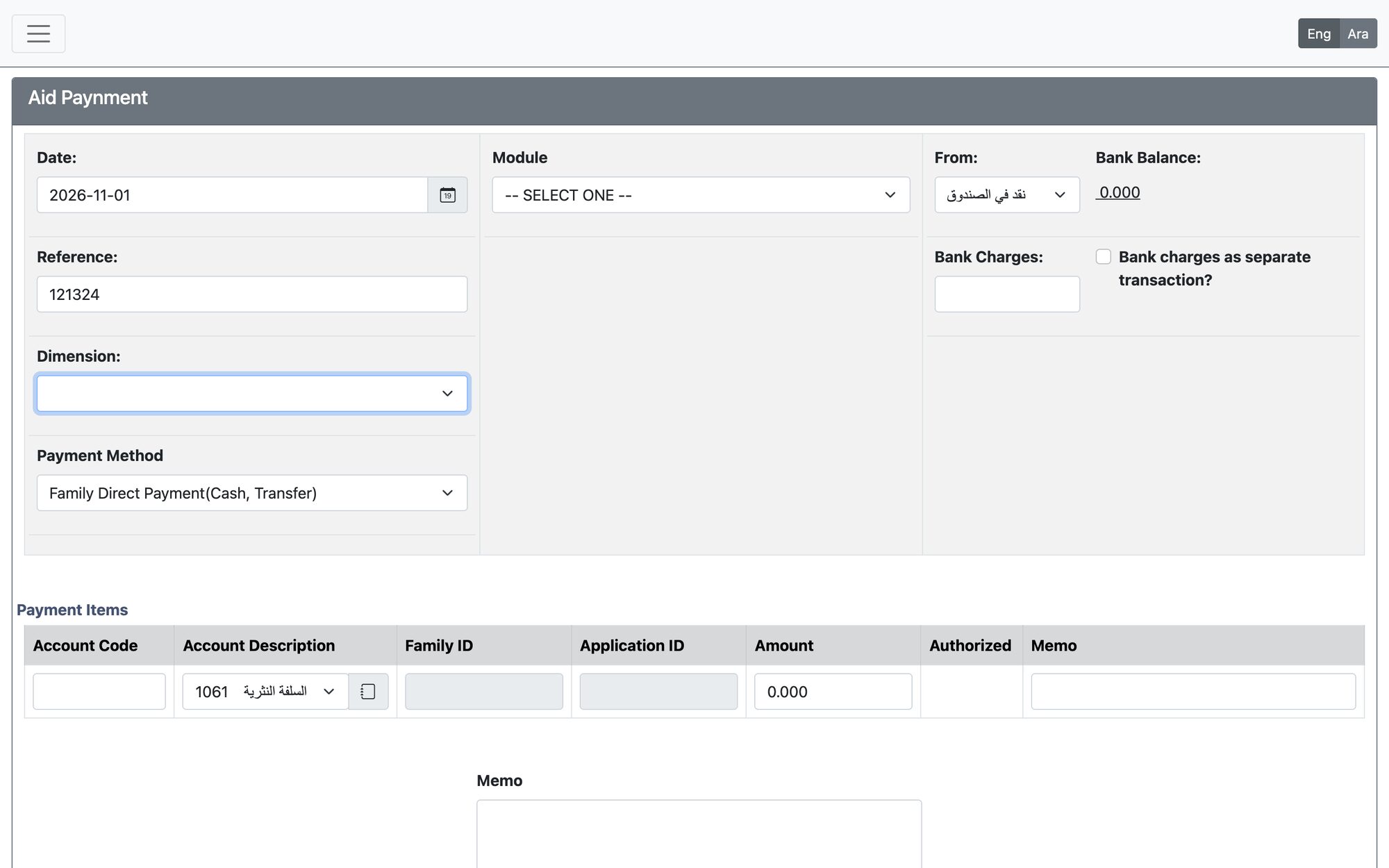
- Choose the Module (the kind of application, for example social research or education) and, where it is shown, the Form Payment Method: Monthly Payment, Budget Payment or Once Payment.
- Choose the Application Type. Search by Family ID or Application ID, or just press Search. For monthly payments choose the Month and Year; depending on the calculation method of the form the screen also shows the person target or budget.
- The applications found are listed under Payment Items with family, application, amount, amount to pay and the authorized person. Remove a line with Delete, or edit it.
- Choose how to pay with Payment Method: Coupon, Family Direct Payment (Cash, Transfer), Family Direct Payment (Cheque), Supplier payment or Payment to Non Supplier.
- Choose the bank account (From) and check the Bank Balance. For cash/transfer and cheque payments choose Cheque and enter the Cheque Number, or Bank Transfer and enter the Bank Transfer ID. With cheque payments to families, consecutive cheque numbers are given to the applications.
- Enter the Bank Charges if any, and tick Bank charges as separate transaction? to post them as their own entry. For coupons enter the coupon start and expiry dates instead.
- Press Update to refresh, then Process Payment.
Applications marked in red have no default authorized person in the family file. Set one in the family file first. The screen also shows the budget remaining for the application type, and a warning if the payment would exhaust it.
After processing
A table lists the entries created: View GL Postings, the cheque to print or the bank transfer ID, the Payment Voucher, the Bank Report in PDF and Excel to send to the bank, and Add an Attachment. The Aid Payment Bank Report is also available from the Social Research and Education report lists, and the ministry report (Payments report by bank) from the Social Research reports.
What the system checks
- Applications that are already paid (once-payment forms) cannot be paid again.
- A cheque number already used on the same bank account is refused.
- The date must be in the fiscal year and the transaction must not exceed the account’s overdraft limit.
- The GL account of the application type must not be a bank account; the bank charge account must be defined for the bank account.
Cancel Aid Payment
Open Banking & General Ledger → Transactions → Cancel Aid Payment.
- Search by Family ID, Application ID or Transaction ID.
- Press Cancel Payment on the transaction. The Action Table opens.
- Set the Voiding Date, write the Memo and press Proceed.
Cancelling voids the whole bank transaction (all applications in it), voids its printed cheque, marks the payment records inactive, and returns each application to the workflow’s Active step with a note in its history. The date must be inside an open fiscal year. This cannot be undone.
Updated: