Payments, deposits and bank account transfers
Record general money going out, money coming in, and transfers between your bank accounts.
These screens are under Banking & General Ledger → Transactions and record entries that are not aid payments.
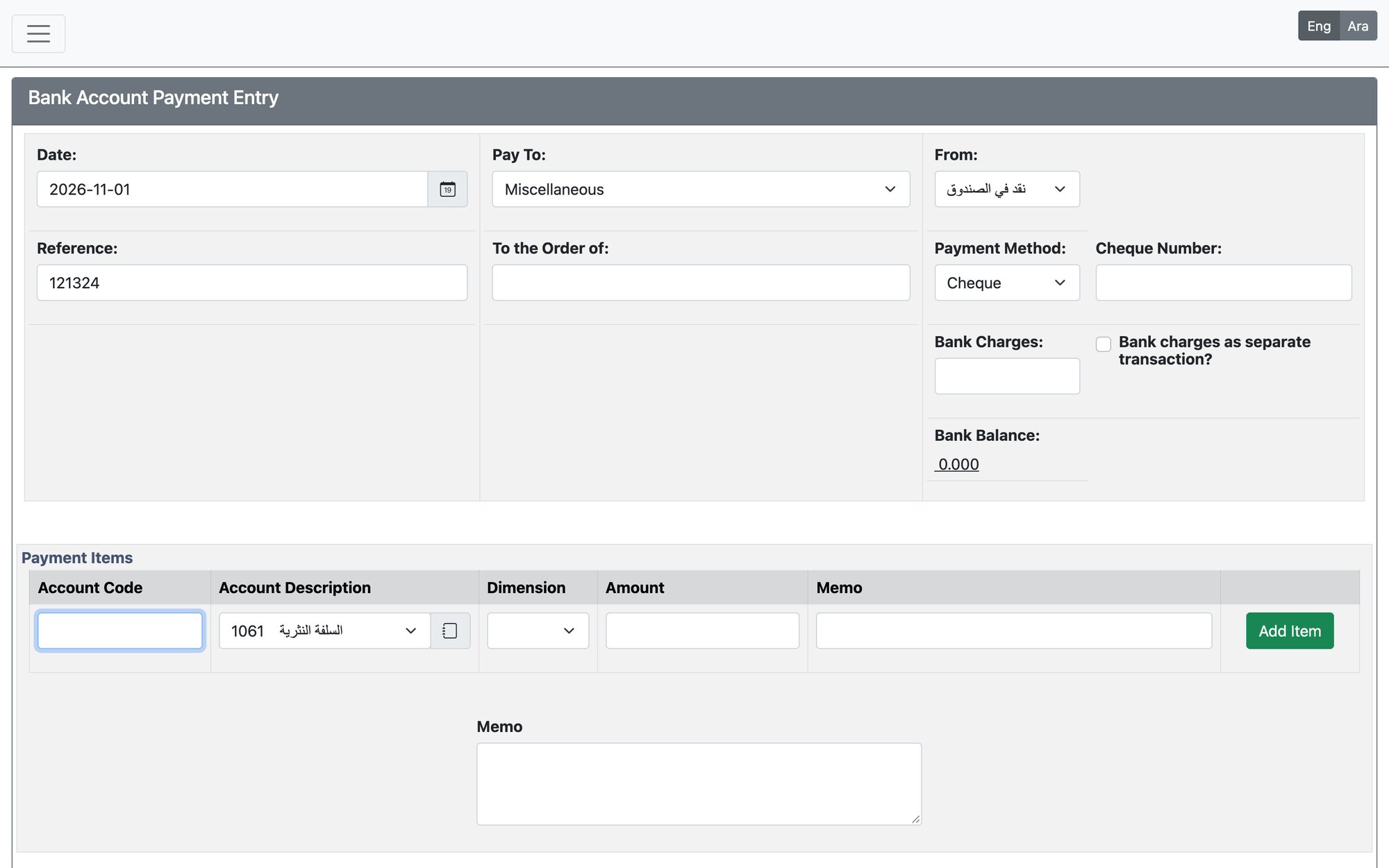
Payments and Deposits
Open Payments (money out) or Deposits (money in).
- Set the Date and check the Reference.
- Choose Pay To / From (supplier, customer or miscellaneous) or a Quick Entry, and the bank account (From for payments, Into for deposits).
- Choose Cheque with its number, or Bank Transfer with its ID, and enter any Bank Charges.
- Add the lines with Add Item: GL account, dimension, amount and memo. The total is shown at the bottom.
- Press Process Payment or Process Deposit.
Bank Account Transfers
Open Banking & General Ledger → Transactions → Bank Account Transfers. Choose From Account and To Account (they must be different), the Transfer Date, the Amount and optional Bank Charge and Memo, then press Enter Transfer.
Rules
- The date must be valid, inside the fiscal year, and not in a closed period.
- The amount must be greater than zero.
- A cheque number already issued on the same bank account is refused.
- The transaction cannot take the account beyond its authorized overdraft limit.
Updated: