General meetings: information, attendance and minutes
Create a general assembly meeting, record attendance against the quorum, and close it with the minutes.
Open Membership & General Assembly → General Meetings & Elections → Add/Update General Meeting. The meeting file has three tabs: General Meeting Main Information, General Meeting Attendance and General Meeting Minutes. Attendance and Minutes open once the meeting is saved. To look at past meetings use Membership & General Assembly → General Meetings & Elections → View General Meetings Information.
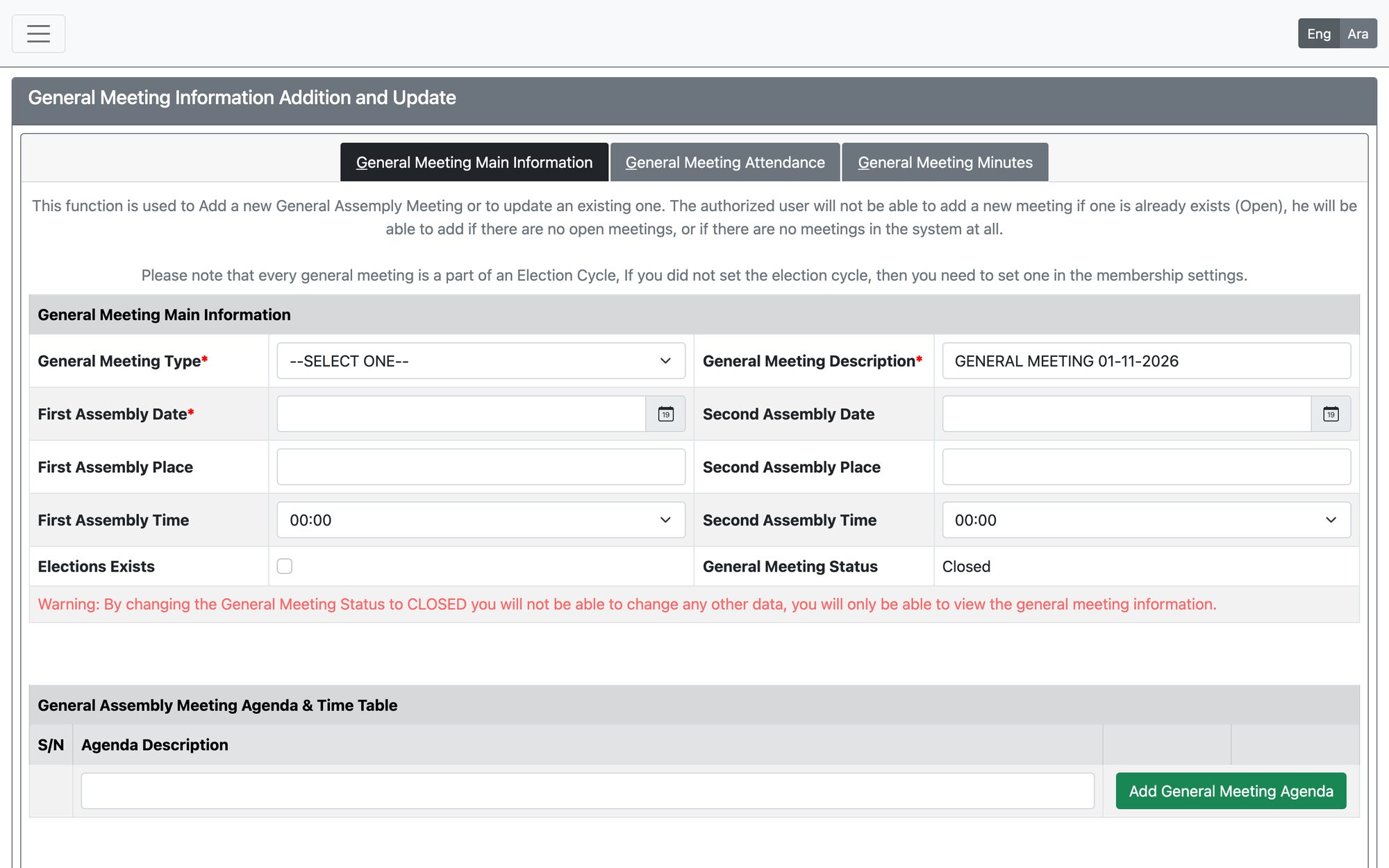
Main information
- General Meeting Type (required): ordinary or extraordinary. Add a description (required).
- First Assembly date (required), time and place; and the Second Assembly date, time and place.
- If the meeting includes elections, set the candidacy opening and closing dates (they must fall on or before the first assembly date) and add the election supervision committee members (supervisor or member).
- Add the meeting agenda items.
- The quorum information is shown from the electoral system settings; you do not enter it here.
Quorum and the first, second and third assembly
The quorum rule and the quorum completion period come from the electoral system settings. The quorum can be one of three options:
- (Half of Members Number) Plus One — the number of active members divided by two, plus one.
- Two-third Majority — two thirds of the active members.
- With who Attended — no minimum; the meeting proceeds with whoever attended.
An ordinary meeting can escalate. If the quorum is not reached, press Meeting Quorum Not Acheived, Start another meeting for the Second Assembly Meeting to create the second meeting, and if that fails again, Meeting Quorum Not Acheived, Start the third and last meeting with who attended. Each meeting has its own quorum and completion period (half an hour or one hour). An extraordinary meeting has a single quorum.
Attendance
- Search by Member Id, mobile, application ID or CPR and press Add to Current General Meeting Attendance List. The page shows the number of active members, the number attended and whether the quorum is achieved (or how many members are still needed).
- Only members with an active, approved application and no unpaid fees can be added. If fees are due, the system shows a link to pay them.
- The membership type must be allowed to vote, and the member must have been registered for at least the minimum period set for voting.
- Registration opens shortly before the meeting start time (according to the completion period) and stops five hours after it starts.
Minutes and closing
In the Minutes tab, attach the minutes and supporting documents of the meeting. When the meeting is done, press Close General Meeting Sucessfully.
Once a meeting is closed you can only view it — its data and minutes can no longer be changed.
Updated: